

- Understanding UHF Wireless Technology in Audio Systems
- Essential Components of a Professional Karaoke DJ Mixer Setup
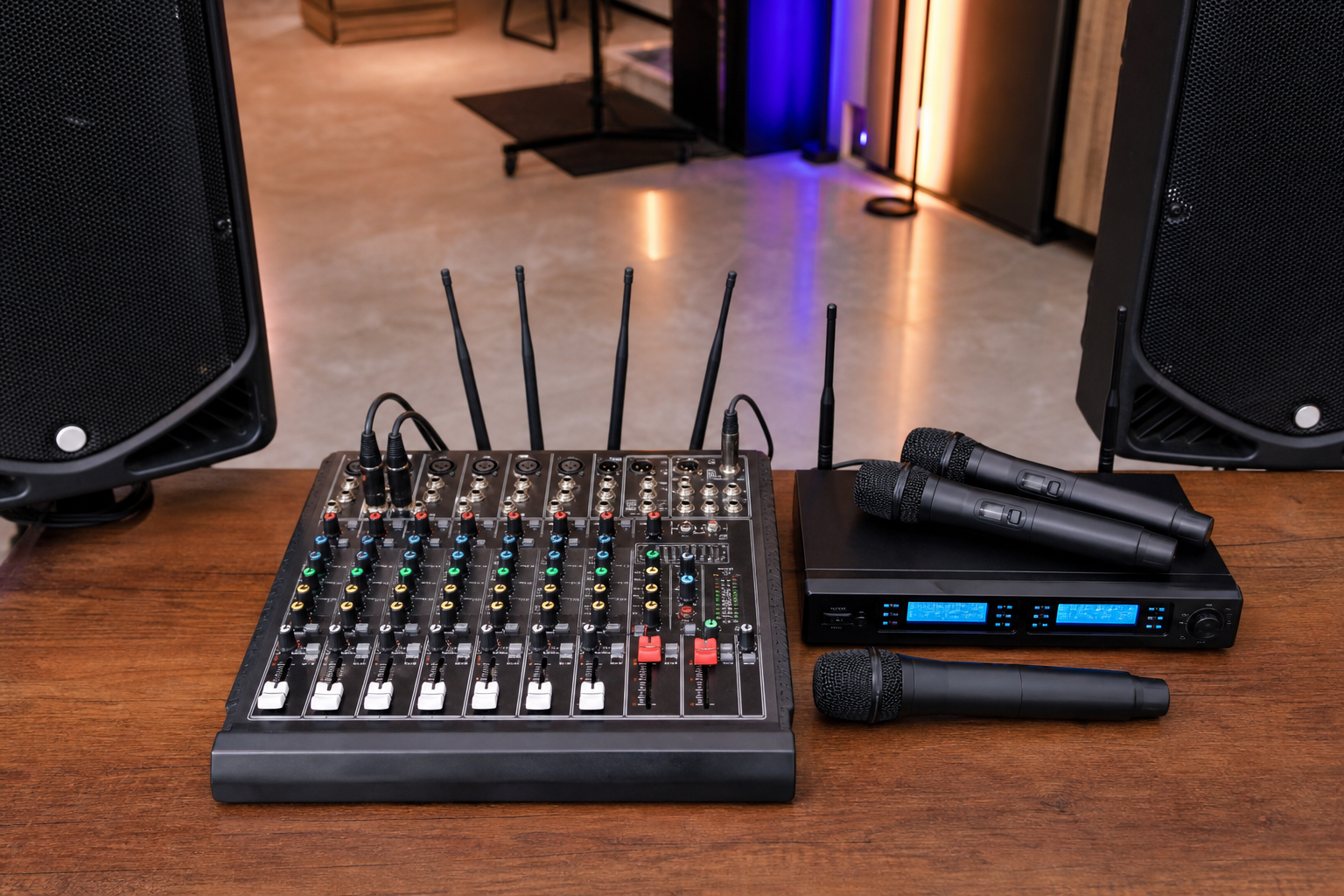
- Wireless Microphone Receivers and Transmitters
- Audio Mixer Console Specifications
- Spotlight: Hridz G04 Audio Mixer Solution
- Step-by-Step Configuration Protocol
- Physical Placement and Connection Architecture
- Frequency Coordination and Channel Assignment
- Optimizing Audio Quality for Live Performance
- Equalization Strategies for Vocal Clarity
- Effects Processing Considerations
- Troubleshooting Common Wireless Mixer Challenges
- Addressing Signal Dropouts and Interference
- Maintenance and Longevity Best Practices
- Expanding Your System Capabilities
- Venue-Specific Configuration Adaptations
- Professional Tips from Industry Practitioners
Setting up a professional audio configuration for DJ performances and karaoke events demands precision, technical acumen, and the right equipment. A UHF wireless mixer for karaoke DJ applications serves as the backbone of seamless audio delivery, enabling performers and hosts to orchestrate sound without the constraints of tangled cables. Whether you're a seasoned audio professional or an emerging entertainer, understanding the intricacies of UHF wireless audio mixer configurations elevates your production quality exponentially.
The marriage between wireless technology and audio mixing capabilities has revolutionized how we approach live sound reinforcement. Gone are the days when performers were tethered to stationary microphone stands. Today's UHF systems provide freedom, flexibility, and professional-grade audio fidelity that satisfies even the most discerning audiophiles.
Understanding UHF Wireless Technology in Audio Systems
Ultra High Frequency (UHF) wireless systems operate within the 470-952 MHz spectrum, offering superior signal stability compared to their VHF counterparts. This frequency range provides remarkable resistance to interference from common electronic devices, making it the preferred choice for professional applications. The bandwidth allocation allows multiple channels to operate simultaneously without cross-contamination, a critical feature when managing numerous performers.
UHF technology employs sophisticated modulation techniques that preserve audio integrity across the wireless transmission path. The increased frequency range translates to better signal penetration through obstacles and reduced susceptibility to atmospheric conditions. For DJs and karaoke hosts working in diverse venues—from intimate lounges to expansive ballrooms—this reliability proves indispensable.
Essential Components of a Professional Karaoke DJ Mixer Setup
Constructing a comprehensive audio ecosystem requires several interconnected elements working in harmonious synchronization. Each component fulfills a specific function within the signal chain, contributing to the overall sonic excellence.
Wireless Microphone Receivers and Transmitters
The wireless microphone subsystem comprises handheld or bodypack transmitters paired with rack-mounted or standalone receivers. Quality transmitters feature robust construction with metal housings that withstand the rigors of repeated performances. Look for units with clear LCD displays showing battery status, frequency selection, and signal strength indicators.
Receivers should offer multiple antenna configurations, preferably with diversity reception technology that automatically selects the strongest signal path. This redundancy minimizes dropouts during critical performance moments.
Audio Mixer Console Specifications
The mixing console serves as the command center where all audio sources converge. Professional-grade mixers designed for DJ and karaoke applications incorporate multiple input channels—typically ranging from 4 to 16—with dedicated EQ controls for tonal sculpting. Integrated digital effects processors add reverb, delay, and echo effects that enhance vocal performances without requiring external peripherals.
Spotlight: Hridz G04 Audio Mixer Solution
For those seeking an all-encompassing solution that eliminates compatibility concerns, the Hridz G04 Audio Mixer with UHF Wireless Microphone presents a meticulously engineered option. This integrated system combines a feature-rich mixing console with professional wireless microphone technology, specifically calibrated for DJ and karaoke applications.
The G04 addresses common pain points encountered during setup procedures. Its pre-paired wireless microphones eliminate frequency coordination headaches, while the mixer's intuitive interface allows rapid sound adjustments during live performances. The system accommodates multiple audio sources—PC recordings, external playback devices, and additional wired microphones—making it exceptionally versatile for varied performance scenarios.
What distinguishes this configuration is its plug-and-play architecture combined with professional-grade audio specifications. The UHF wireless subsystem operates on interference-free channels, ensuring crystalline vocal reproduction even in electromagnetically congested environments. For photographers documenting events, videographers capturing performances, and musicians requiring reliable audio reinforcement, this unified solution streamlines technical workflows considerably.
Step-by-Step Configuration Protocol
Proper installation methodology determines whether your audio system delivers pristine sound or frustrating technical difficulties. Follow this systematic approach for optimal results.
Physical Placement and Connection Architecture
Position your mixer at a strategic location offering clear line-of-sight to the performance area. UHF signals propagate most effectively without physical obstructions, though they penetrate barriers better than lower frequencies. Mount wireless receivers at elevated positions, angling antennas in a "V" configuration approximately 45 degrees apart for maximum diversity reception.
Connect output sources to powered speakers using balanced XLR or TRS cables. Balanced connections reject electromagnetic interference over long cable runs, preserving audio clarity. Avoid routing audio cables parallel to power cables, as this invites unwanted hum into your signal path.
Frequency Coordination and Channel Assignment
Modern UHF systems offer multiple operating frequencies to accommodate simultaneous microphone usage. Survey the RF spectrum using the mixer's scanning function to identify clean channels devoid of interference. Document your frequency assignments for future reference and quick reconfiguration.
Maintain adequate frequency separation between active channels—typically 500 kHz minimum—to prevent intermodulation distortion. This spacing becomes increasingly critical when operating three or more wireless microphones concurrently.
Optimizing Audio Quality for Live Performance
Technical setup represents only the foundation; sonic refinement transforms adequate audio into captivating sound experiences.
Equalization Strategies for Vocal Clarity
Karaoke vocals benefit from strategic EQ adjustments that enhance intelligibility without introducing harshness. Apply a gentle high-pass filter around 80-100 Hz to eliminate subsonic rumble and proximity effect. Boost presence frequencies between 3-5 kHz moderately to help vocals cut through dense musical backing tracks. Exercise restraint with mid-range frequencies, as excessive boosting creates nasally, fatiguing tonality.
Effects Processing Considerations
Reverb application adds dimension and polish to vocal performances, simulating natural acoustic spaces. For karaoke applications, medium hall settings with 1.5-2.5 second decay times typically yield pleasing results. Avoid excessive reverb depths that obscure lyrical articulation. Echo effects, when applied judiciously, can mask minor pitch inconsistencies while adding rhythmic interest.
Troubleshooting Common Wireless Mixer Challenges
Even meticulously configured systems occasionally exhibit issues requiring diagnostic intervention.
Audio dropouts, interference artifacts, and unexpected noise require systematic troubleshooting approaches. Understanding signal flow pathways enables rapid problem identification and resolution.
Addressing Signal Dropouts and Interference
Intermittent audio dropouts typically indicate inadequate signal strength or frequency conflicts. Verify transmitter battery levels first—weak batteries produce inconsistent RF output. Reduce physical distance between transmitters and receivers, or relocate receivers away from metal surfaces that reflect RF energy unpredictably.
If interference persists, rescan available frequencies and migrate to cleaner channels. Nearby wireless networks, digital video equipment, and even LED lighting systems can generate RF noise within the UHF spectrum.
Maintenance and Longevity Best Practices
Protecting your investment requires consistent maintenance protocols that extend equipment lifespan and ensure reliability.
- Store wireless microphones with batteries removed to prevent corrosive leakage damage
- Clean microphone grilles regularly using compressed air and antimicrobial solutions
- Inspect antenna connections for oxidation or looseness that degrades signal reception
- Keep firmware updated on digital wireless systems to access performance improvements
- Document your frequency assignments and mixer settings for rapid reconfiguration
Expanding Your System Capabilities
As your performance requirements evolve, modular expansion capabilities become increasingly valuable. Quality UHF wireless mixers accommodate additional microphones, instrument inputs, and external effects processors through auxiliary connections and expansion buses.
Consider integration with recording interfaces for capturing performances or creating promotional content. Many contemporary mixers feature USB connectivity that enables direct digital recording to computers without requiring separate audio interfaces. This functionality proves invaluable for videographers documenting events and musicians archiving their performances.
Venue-Specific Configuration Adaptations
Different performance environments demand tactical adjustments to your audio configuration strategy.
| Venue Type | Primary Challenge | Configuration Adjustment |
|---|---|---|
| Small Indoor Spaces | Acoustic reflections causing feedback | Reduce monitor levels, position speakers away from reflective surfaces |
| Large Halls | Extended wireless range requirements | Utilize antenna distribution systems, increase transmitter power |
| Outdoor Venues | RF interference from external sources | Conduct thorough frequency scans, use directional antennas |
| Multi-room Facilities | Signal penetration through walls | Deploy remote antenna placement, consider frequency coordination |
Professional Tips from Industry Practitioners
Experienced audio professionals employ nuanced techniques that distinguish amateur configurations from professional installations. Always conduct sound checks with actual performance volumes rather than conservative levels. Feedback tendencies and tonal characteristics shift dramatically as SPL increases.
Label all connections meticulously using color-coded tape or professional cable markers. When technical difficulties arise mid-performance, clear labeling enables rapid troubleshooting without confusion. Carry backup batteries, spare cables, and if possible, a reserve wireless microphone system for mission-critical applications.
The investment in quality UHF wireless mixer technology for karaoke DJ applications pays dividends through reliability, audio fidelity, and operational flexibility. Whether serving intimate gatherings or commanding large-scale events, properly configured wireless audio systems empower performers while simplifying technical logistics. At Hridz.com.au, we understand the exacting standards of photographers, videographers, DJs, musicians, and karaoke enthusiasts who demand equipment that performs flawlessly when stakes are highest. Our curated selection of audio mixing solutions, wireless microphone systems, and professional accessories ensures you have access to tools that match your ambitions.





Share:
Choosing Photography Lighting: Complete Guide for Studio Success
Video Audio Setup: Essential Equipment for Content Creators 2026